Due to a ransomware attack, the wiki was reverted to a July 2022 version. . We apologize for the lack of a more recent valid backup.
...
The rate is in accordance with the sequence 1000、2000、3000、4000 ... ...
Suggestions
- The transmission frequency of packet_in
We suggest the packet_in interval is 50ms, that is 20 copies of packet_in messages are send in one second, every copy contains numbers of packet_in packets, and this can be configured in IxNetwork. - Environment
This test result depends on the test environment, the results measured in different environments will be very different, in the VM environment and the physical environment the results of the test difference of nearly 10 times.
Preparation
Features install
onos> feature:install onos-driversonos> feature:install onos-openflowonos> feature:install onos-openflow-baseonos> feature:install onos-app-fwdonos> feature:install onos-host-provider
Test steps
1. Config IxNetwork with one switch and two hosts. Set the packet_in messages of the switch, the interval is 50ms, total 100000 packets, using ICMP packets.
2. Start the controller with the features install.
3. Start the OF protocol of the switch.
Preparation
Test steps
...
4. Wait until the channel is established and Echo message interaction started.
5. Start the capture of IxNetwork.
6. Enable packet_in, wait until all of the packet_in messages are sent and no flow_mod messages receive.
7. Stop the capture, analyse the messages captured. First verify the number of flow_mod message N, N should be equal to 100000, if N is less than 1 million, restart this test with smaller packet_in rate. Second, calculate the time difference between the first flow_mod message and the last flow_mod message T, the flow_mod rate can be calculated by N/T. Third, calculate the time delay of each packet_in-flow_mod pair as t1、t2、t3 ... ... , of course this can be caculate by decentralized way(select ten sets of pairs), at last calculate the latency by t1+t2+t3 ... ... /N.
8. Clean the configuration of controllers and IxNetwork.
9. Repeat test step 1-9 for five times.
10. Restart the test with another packet_in rate.
Test Results
Flow_mod rate and latency
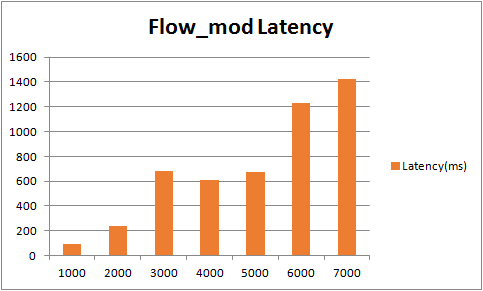
Packet_in rate(p/s) Flow_mode rate(p/s) Latency(ms) 1000 1005 89.6 2000 1998 241.5 3000 2997 683.1 4000 3126 612.2 5000 3254 673.3 6000 3361 1233 7000 3556 1421 - Histogram of Packet_out rate

- Histogram of Packet_out latency