This walkthrough demonstrates most SONA features, as well as its typical usage in concert with OpenStack. The walkthrough assumes that you are familiar with how to use ONOS and OpenStack. If you're not, we recommend you to go through Tutorials and Walkthroughs and http://docs.openstack.org.
Tip) The following cloud-init script helps to set password of "ubuntu" user to "ubuntu" for UEC image, if you pass this script to Nova with "--user-data" option when you create a new VM.
#cloud-config
password: ubuntu
chpasswd: { expire: False }
ssh_pwauth: True |
Create two tenant networks and virtual machines in OpenStack, and then test tenant network connectivity and isolation.
neutron net-create net-A neutron subnet-create net-A 192.168.0.0/24 neutron net-create net-B neutron subnet-create net-B 192.168.1.0/24 nova boot --flavor 2 --image ubuntu-14.04-server-cloudimg-amd64 --user-data passwd.data --nic net-id=[net-A-UUID] net-A-01 nova boot --flavor 2 --image ubuntu-14.04-server-cloudimg-amd64 --user-data passwd.data --nic net-id=[net-A-UUID] net-A-02 nova boot --flavor 2 --image ubuntu-14.04-server-cloudimg-amd64 --user-data passwd.data --nic net-id=[net-B-UUID] net-B-01 |
Create another network for the external access and floating IP with the subnet range specified in the ONOS-vRouter network config(see SONA Network Configuration Guide).
neutron net-create net-public --router:external True --provider:physical_network external --provider:network_type flat neutron subnet-create net-public 172.27.0.0/24 |
Create a router, and add gateway and interfaces.
neutron router-create router-01 neutron router-gateway-set router-01 net-public neutron router-interface-add rotuer-01 [net-A-subnet UUID] neutron router-interface-add router-01 [net-B-subnet UUID] |
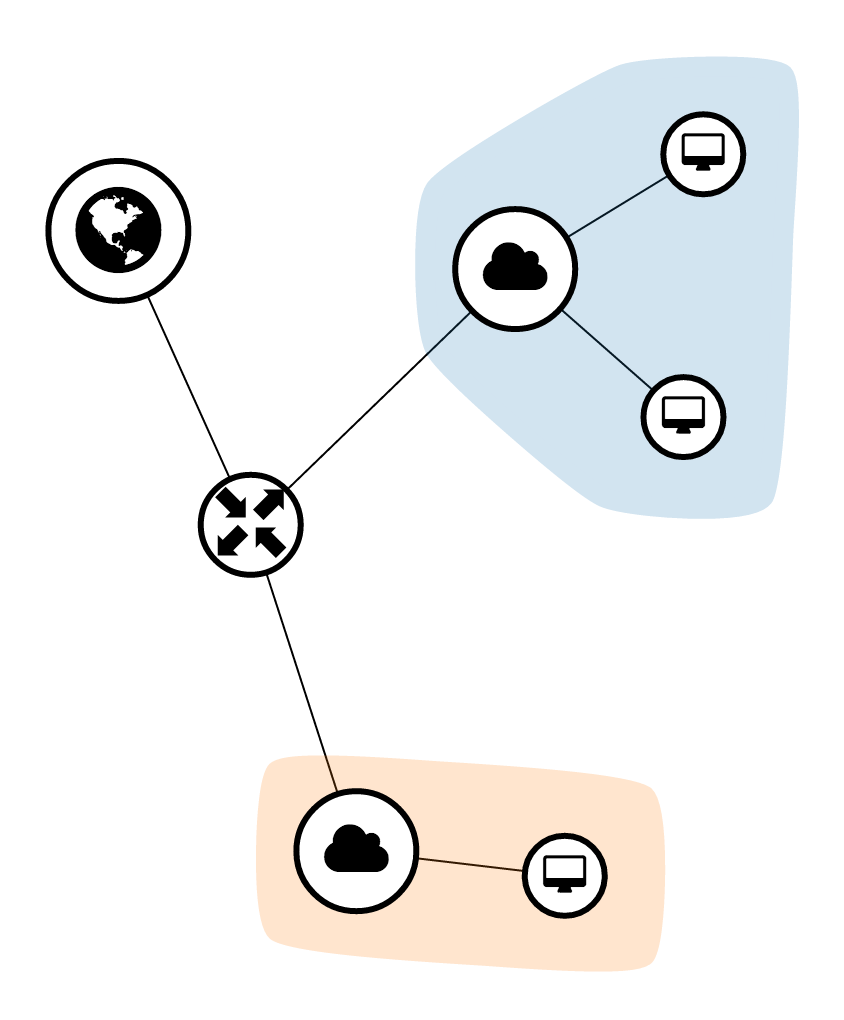
Now the network topology should look like the figure below if you check it in Horizon.
Create a security group to allow external access, and add it to the net-A-01 and net-B-01.
neutron security-group-create allow-external neutron security-group-rule-create --direction ingress --remote-ip-prefix 0.0.0.0/0 allow-external neutron port-update [net-A-01 port UUID] --security-group [default-security-group UUID] --security-group allow-external neutron port-update [net-B-01 port UUID] --security-group [default-security-group UUID] --security-group allow-external |
Currently, SONA security group implementation has two limitations. 1) It does not support the rule updates to the existing security group. 2) Due to the difficulties of connection tracking with OVS and OpenFlow, it does not allow ingress traffic via a connected session by default. So you need to add allow rule with ingress direction explicitly to access to the external networks. |
Create a floating IP and associate it to net-A-01.
neutron floatingip-create net-public neutron floatingip-associate [floating-ip-id] [net-A-01 port UUID] |
Scale out compute or gateway node is easy. Just add the new node to the SONA network config and update the config to the ONOS-SONA.
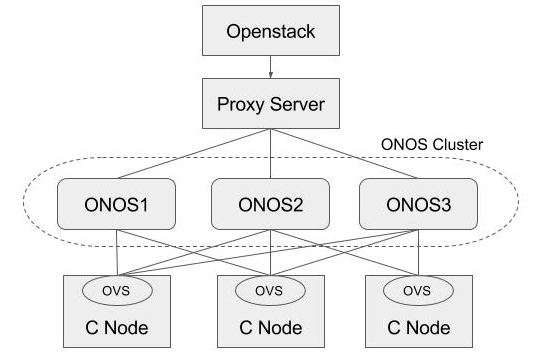
Basically, ONOS itself provides HA by default when there are multiple instances in the cluster. This section describes how to add a proxy server beyond the ONOS cluster, and make use of it in Neutron as a single access point of the cluster. For the proxy server, we used the HA proxy server (http://www.haproxy.org) here.
$ sudo add-apt-repository -y ppa:vbernat/haproxy-1.5 $ sudo add-apt-repository -y ppa:vbernat/haproxy-1.5 $ sudo apt-get update $ sudo apt-get install -y haproxy |
global
    log /dev/log    local0
    log /dev/log    local1 notice
    chroot /var/lib/haproxy
    stats socket /run/haproxy/admin.sock mode 660 level admin
    stats timeout 30s
    user haproxy
    group haproxy
    daemon

    # Default SSL material locations
    ca-base /etc/ssl/certs
    crt-base /etc/ssl/private

    # Default ciphers to use on SSL-enabled listening sockets.
    # For more information, see ciphers(1SSL). This list is from:
    #  https://hynek.me/articles/hardening-your-web-servers-ssl-ciphers/
    ssl-default-bind-ciphers ECDH+AESGCM:DH+AESGCM:ECDH+AES256:DH+AES256:ECDH+AES128:DH+AES:ECDH+3DES:DH+3DES:RSA+AESGCM:RSA+AES:RSA+3DES:!aNULL:!MD5:!DSS
    ssl-default-bind-options no-sslv3

defaults
    log global
    mode    http
    option  httplog
    option  dontlognull
        timeout connect 5000
        timeout client  50000
        timeout server  50000

    errorfile 400 /etc/haproxy/errors/400.http
    errorfile 403 /etc/haproxy/errors/403.http
    errorfile 408 /etc/haproxy/errors/408.http
    errorfile 500 /etc/haproxy/errors/500.http
    errorfile 502 /etc/haproxy/errors/502.http
    errorfile 503 /etc/haproxy/errors/503.http
    errorfile 504 /etc/haproxy/errors/504.http

frontend localnodes
        bind *:8181
        mode http
        default_backend nodes

backend nodes
        mode http
        balance roundrobin
        option forwardfor
        http-request set-header X-Forwarded-Port %[dst_port]
        http-request add-header X-Forwarded-Proto https if { ssl_fc }
        option httpchk GET /onos/ui/login.html
        server web01 [onos-01 IP address]:8181 check
        server web02 [onos-02 IP address]:8181 check
        server web03 [onos-03 IP address]:8181 check

listen stats *:1936
    stats enable
    stats uri /
    stats hide-version
stats auth someuser:password |
Set url_path to point to the proxy server in Neutron ML2 ONOS mechanism driver configuration and restart Neutron.
# Configuration options for ONOS ML2 Mechanism driver [onos] # (StrOpt) ONOS ReST interface URL. This is a mandatory field. url_path = http://[proxy-server IP]:8181/onos/openstackswitching # (StrOpt) Username for authentication. This is a mandatory field. username = onos # (StrOpt) Password for authentication. This is a mandatory field. password = rocks |
Stop one of the ONOS instance and check everything works fine.
$ onos-service $OC1 stop |