Due to a ransomware attack, the wiki was reverted to a July 2022 version. . We apologize for the lack of a more recent valid backup.
...
Scale out compute or gateway node is easy. Just add the new node to the SONA network config and update the config to the ONOS-SONA.
HA Setup
Basically, ONOS itself provides HA by default when there are multiple instances in the cluster. This section describes how to add a proxy server beyond the ONOS cluster, and make use of it in Neutron as a single access point of the cluster. For the proxy server, we used the HA proxy server (http://www.haproxy.org) here.
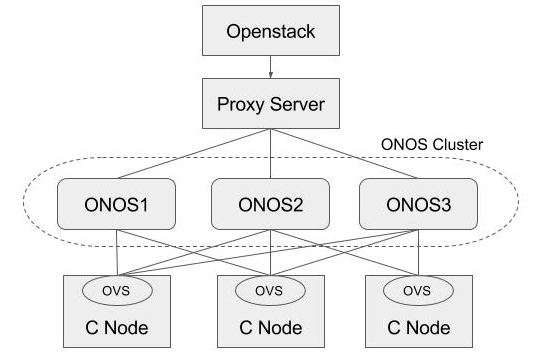
Install HA proxy
| Code Block | ||
|---|---|---|
| ||
$ sudo add-apt-repository -y ppa:vbernat/haproxy-1.5
$ sudo add-apt-repository -y ppa:vbernat/haproxy-1.5
$ sudo apt-get update
$ sudo apt-get install -y haproxy |
Configure HA proxy
| Code Block | ||
|---|---|---|
| ||
global
    log /dev/log    local0
    log /dev/log    local1 notice
    chroot /var/lib/haproxy
    stats socket /run/haproxy/admin.sock mode 660 level admin
    stats timeout 30s
    user haproxy
    group haproxy
    daemon

    # Default SSL material locations
    ca-base /etc/ssl/certs
    crt-base /etc/ssl/private

    # Default ciphers to use on SSL-enabled listening sockets.
    # For more information, see ciphers(1SSL). This list is from:
    #  https://hynek.me/articles/hardening-your-web-servers-ssl-ciphers/
    ssl-default-bind-ciphers ECDH+AESGCM:DH+AESGCM:ECDH+AES256:DH+AES256:ECDH+AES128:DH+AES:ECDH+3DES:DH+3DES:RSA+AESGCM:RSA+AES:RSA+3DES:!aNULL:!MD5:!DSS
    ssl-default-bind-options no-sslv3

defaults
    log global
    mode    http
    option  httplog
    option  dontlognull
        timeout connect 5000
        timeout client  50000
        timeout server  50000

    errorfile 400 /etc/haproxy/errors/400.http
    errorfile 403 /etc/haproxy/errors/403.http
    errorfile 408 /etc/haproxy/errors/408.http
    errorfile 500 /etc/haproxy/errors/500.http
    errorfile 502 /etc/haproxy/errors/502.http
    errorfile 503 /etc/haproxy/errors/503.http
    errorfile 504 /etc/haproxy/errors/504.http

frontend localnodes
        bind *:8181
        mode http
        default_backend nodes

backend nodes
        mode http
        balance roundrobin
        option forwardfor
        http-request set-header X-Forwarded-Port %[dst_port]
        http-request add-header X-Forwarded-Proto https if { ssl_fc }
        option httpchk GET /onos/ui/login.html
        server web01 [onos-01 IP address]:8181 check
        server web02 [onos-02 IP address]:8181 check
        server web03 [onos-03 IP address]:8181 check

listen stats *:1936
    stats enable
    stats uri /
    stats hide-version
stats auth someuser:password |
Configure Neutron
Set url_path to point to the proxy server in Neutron ML2 ONOS mechanism driver configuration and restart Neutron.
| Code Block | ||
|---|---|---|
| ||
# Configuration options for ONOS ML2 Mechanism driver
[onos]
# (StrOpt) ONOS ReST interface URL. This is a mandatory field.
url_path = http://[proxy-server IP]:8181/onos/openstackswitching
# (StrOpt) Username for authentication. This is a mandatory field.
username = onos
# (StrOpt) Password for authentication. This is a mandatory field.
password = rocks |
Test HA
Stop one of the ONOS instance and check everything works fine.
| Code Block |
|---|
$ onos-service $OC1 stop |