Due to a ransomware attack, the wiki was reverted to a July 2022 version. . We apologize for the lack of a more recent valid backup.
...
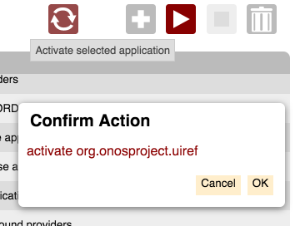
Here is the dialog in action in the Application View:
Name | Summary |
|---|---|
openDialog | Opens (creates if necessary) the dialog. |
closeDialog | Closes the dialog. |
createDiv | Creates an unattached <div> element. |
Function Descriptions
openDialog
...
| Example Usage | Arguments | Return Value |
|---|---|---|
dialog.setTitle(title); | title - the text to set as the title | dialog API |
dialog.addContent(content); | content - a D3 selection to be appended to the content section of the dialog | dialog API |
| cb - the callback function to be invoked when the button is pressed text - the text to display on the button key - the logical name of the keyboard key bound to the button chained - boolean true prevents dialog from being hidden when the button is pressed | dialog API |
dialog.addOk(cb, text); | cb - the callback function to be invoked when the button is pressed text - the text to display on the button [defaults to "OK"] | dialog API |
dialog.addOkChained(cb, text); | cb - the callback function to be invoked when the button is pressed text - the text to display on the button [defaults to "OK"] | dialog API |
dialog.addCancel(cb, text); | cb - the callback function to be invoked when the button is pressed dialog APIpressed text - the text to display on the button [defaults to "Cancel"] | dialog API |
dialog.bindKeys(); | (none) | (none) |
Notes:
- addOk() is shorthand for invoking addButton() bound to the enter key, with chained == false
- addOkChained() is shorthand for invoking addButton() bound to the enter key, with chained == true
- addCancel() is shorthand for invoking addButton bound to the escape key, with chained == false
- specifying chained == true prevents the dialog from being dismissed; this allows the dialog to be reconfigured with a follow-on question
- bindKeys() is required to be called as the last function, to bind the keys to the key service.
The following dialog box might have code structured as listed below:
...
| Code Block | ||||
|---|---|---|---|---|
| ||||
// ds is a reference to the DialogService.

var dialogId = 'app-dialog',
    dialogOpts = {
        edge: 'right'
    };

function createConfirmationText(action, itemId) {
    var content = ds.createDiv();
    content.append('p').text(action + ' ' + itemId);
    return content;
}

function confirmAction(action) {
    var itemId = $scope.selId,
    spar = $scope.sortParams;

    function dOk() {
        $log.debug('Initiating', action, 'of', itemId);
        wss.sendEvent(appMgmtReq, {
            action: action,
            name: itemId,
            sortCol: spar.sortCol,
            sortDir: spar.sortDir
        });
    }

    function dCancel() {
        $log.debug('Canceling', action, 'of', itemId);
    }

    ds.openDialog(dialogId, dialogOpts)
        .setTitle('Confirm Action')
        .addContent(createConfirmationText(action, itemId))
        .addButtonaddOk('OK', dOk)
        .addButton('Cancel', dCanceladdCancel(dCancel)
        .bindKeys();
}

// e.g. confirmAction('activate');
// $scope.selId contains the ID of the selected item |
Notice how buttons added to the dialog appear right to left.
Also note, since addButton() takes just a function reference as its first argument, any data required for the function should be defined in the closure.