Due to a ransomware attack, the wiki was reverted to a July 2022 version. . We apologize for the lack of a more recent valid backup.
...
Internet Access from VM (only for test)
If you want to access a VM through SSH or access the Internet from VM without fabric controller and vRouter, you need to do setup the followings in your compute node. Basically, this settings mimics fabric switch and vRouter inside a compute node, that is, "fabric" bridge corresponds to fabric switch and Linux routing tables corresponds to vRouter. You'll need at least two physical interface for this test setup.
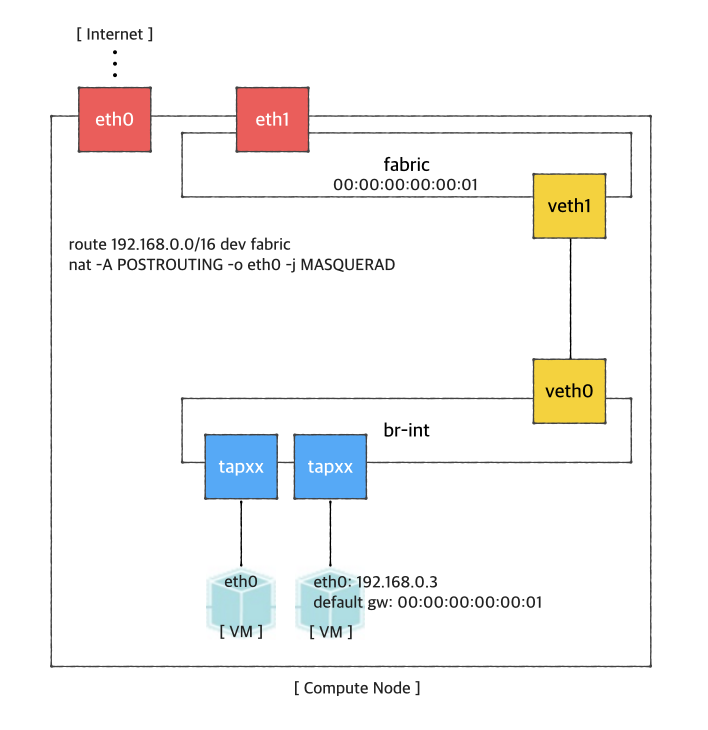
First, you'd create a bridge named "fabric" (it doesn't have to be fabric).
| Code Block | ||
|---|---|---|
| ||
$ sudo brctl addbr fabric |
Create a veth pair and set veth0 as a "dataPlaneIntf" in network-cfg.json
| Code Block | ||
|---|---|---|
| ||
$ ip link add veth0 type veth peer name veth1 |
Now, add veth1 and the actual physical interface, eth1 here in example, to the fabric bridge.
| Code Block | ||
|---|---|---|
| ||
$ sudo brctl addif fabric veth1
$ sudo brctl addif fabric eth1
$ sudo brctl show
bridge name bridge id       STP enabled interfaces
fabric      8000.000000000001   no      eth1
veth1 |
Set fabric bridge MAC address to the virtual gateway MAC address, which is "privateGatewayMac" in network-cfg.json.
| Code Block | ||
|---|---|---|
| ||
$ sudo ip link set address 00:00:00:00:00:01 dev fabric |
Now, add routes of your virtual network IP ranges and NAT rules.
| Code Block | ||
|---|---|---|
| ||
$ sudo route add -net 192.168.0.0/16 dev fabric $ sudo netstat -rn Kernel IP routing table Destination Gateway Genmask Flags MSS Window irtt Iface 0.0.0.0 45.55.0.1 0.0.0.0 UG 0 0 0 eth0 45.55.0.0 0.0.0.0 255.255.224.0 U 0 0 0 eth0 192.168.0.0 0.0.0.0 255.255.0.0 U 0 0 0 fabric $ sudo iptables -A FORWARD -d 192.168.0.0/16 -j ACCEPT $ sudo iptables -A FORWARD -s 192.168.0.0/16 -j ACCEPT $ sudo iptables -t nat -A POSTROUTING -o eth0 -j MASQUERADE |
You should enable ip_forward, of course.
| Code Block | ||
|---|---|---|
| ||
$ sudo sysctl net.ipv4.ip_forward=1 |
It's ready. Make sure all interfaces are activated and able to ping to the other compute nodes with "hostManagementIp".
| Code Block | ||
|---|---|---|
| ||
$ sudo ip link set br-int up $ sudo ip link set veth0 up $ sudo ip link set veth1 up $ sudo ip link set fabric up |